Syntax highlighting only for C and CPP questions problem

Re: Syntax highlighting only for C and CPP questions problem

von Giuliana Barberis -
Anzahl Antworten: 2
hi Richard thank you very much,
I try to answer your questions:
I use the built-in Python3 question type.
I use also Sql language and there isn't any highlight. To try other languages I tried also with Cpp and there isn't any highlight too.
I tried creating a new question where I checked the customise box and I correctly found language = python3 and Ace language empty.
But I don't understand how can I verify if my Moodle has Ace in Python mode, how do I make appear the window you showed me above?
I'm sorry for my confusion .. but thank you
Als Antwort auf Giuliana Barberis

Re: Syntax highlighting only for C and CPP questions problem

von Richard Lobb -
Hi Giuliana

If you're editing code within an Ace window and type the comma key while holding down Ctrl, you should get the menu I've shown above. Is that not working for you? Perhaps try doing that in the demo page on this website to see if it behaves differently from your site as confirmation?

If syntax highlighting isn't working with multiple languages, I think Ace is somewhat broken on your system. Has it ever worked properly in the past? I assume it also doesn't work within the question authoring form (e.g. the sample answer field)?

Ace is packaged into CodeRunner, complete with around 175 different language modes. The full set of modes should be displayed in the mode dropdown in the Ace menu, if you're able to bring that up.

My current guess is that Ace is failing to fetch the mode scripts. If that's the case, you should see an error in the JavaScript console. To check for this, use the Chrome browser, open the Developer Tools page (e.g. type Shift+Ctrl+I) and select the Console tab. Then load a CodeRunner question. What do you see in the Console tab? You might also try selecting the Network tab and reloading. Are there any 404s in there?

I'm struggling to think of a likely cause for this issue, but three vague possibilities are:
  1. The CodeRunner install is corrupted. Updating to the latest version might be worth a try.
  2. The file access permissions are wrongly set within the ace folder of the CodeRunner plugin. 
  3. There's some extra security plugin on your Moodle site that is disallowing the loading of the mode files.

Als Antwort auf Richard Lobb

Re: Syntax highlighting only for C and CPP questions problem

von Giuliana Barberis -
Hi Richard,
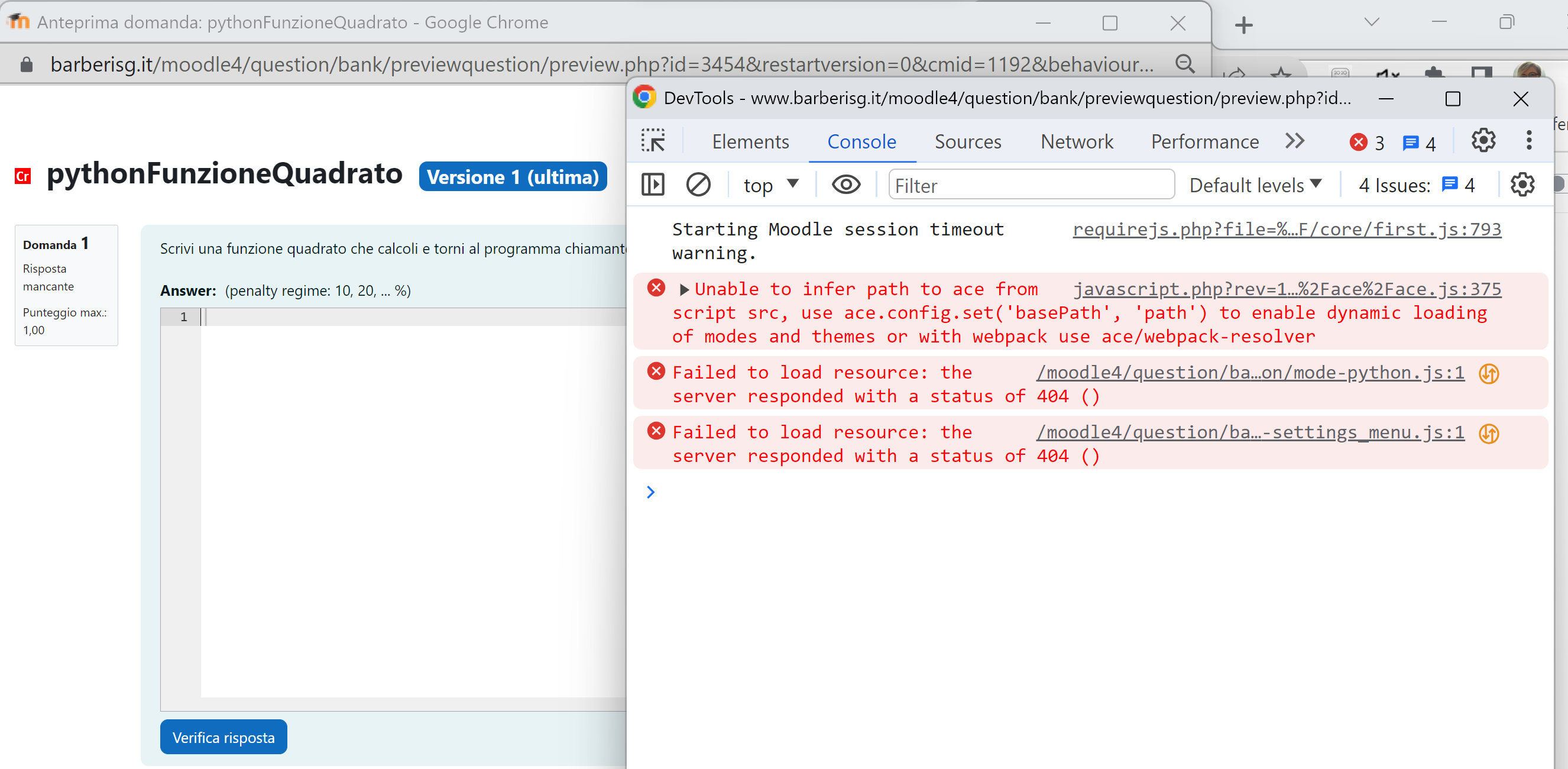
you are right, Ace is failing to fetch the mode scripts. Here is the printscreen of the javascript console when I try to press ctrl+comma (I updated CodeRunner to the latest version e after this I made this printscreen)
ace error

Until last June I had moodle 3.11 and everything worked correctly, in the Summer I update to Moodle 4.1.5 and I reinstalled the latest version of CodeRunner.
But hear this! Now is everything ok!!
The problem was related to the slash arguments
I had 'Use slash arguments' disabled, I enabled it from Administration > Site administration > Server > Environment and all is gone right.
Thank you for your availability and extreme kindness.