• Welcome to Moodle CodeRunner

    CodeRunner is a free open-source question-type plug-in for Moodle that can run program code submitted by students in answer to a wide range of programming questions in many different languages. It is intended primarily for use in computer programming courses although it can be used to grade any question for which the answer is text. Experienced users can also present users with questions formatted in HTML with additional JavaScript; almost any sort of question can be accommodated using this facility (see the Html UI).

    CodeRunner is normally used in Moodle's adaptive quiz mode; students paste in their code in answer to each programming question and get to see their test-case results immediately. They can then correct their code and resubmit, typically for a small penalty.

    For example:
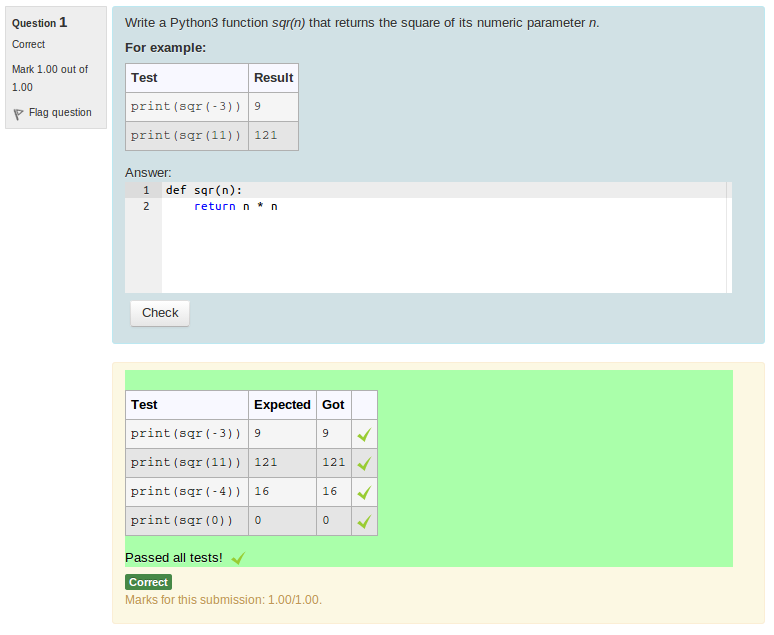
    Image of a simple CodeRunner question

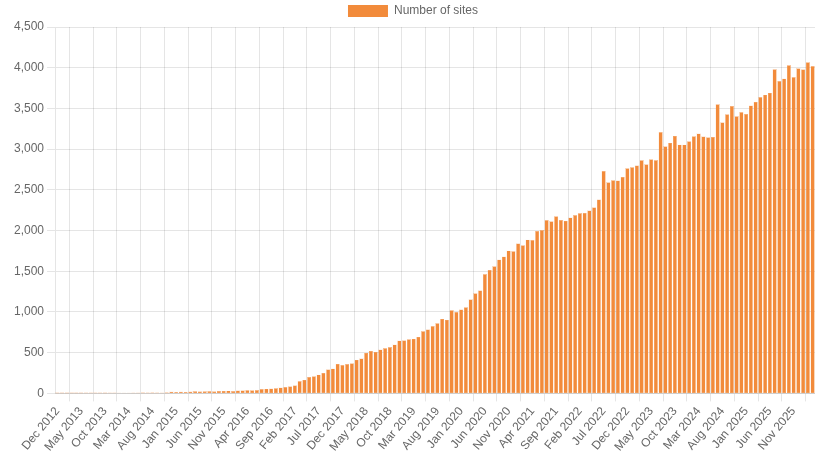
    CodeRunner is currently used on around 4000 registered Moodle sites worldwide, as shown in the following chart from the Moodle plugin repository:
    • Demo questions

      To see how CodeRunner questions behave, try visiting the Python3 demo page below.

      To run the code in the sections that follow, please log in as:

      Username: trial
      Password: trial

      You may need to refresh the page immediately after logging in to see all the questions. 

      The Python page is recommended to give you a feel for CodeRunner's capabilities, even if you don't understand Python3; the questions could (for the most part) be written in any of the supported Languages (Python2, Python3, C, C++, Java, PHP, JavaScript, Octave).

      The other pages shows a few simple C and Java questions, and demonstrate a few other features of CodeRunner such as SQL, the GraphUI and a Python3 'sandpit' that provides students with a question in which they can test out any code, including code that plots a graph using matplotlib.

    • CodeRunner Authors' Forum

      A forum for exchange of question ideas and suggestions, bug-reports or anything else related to CodeRunner. Subscribe yourself to this forum if you wish to receive such news.

    • Documentation

      There is lots of in-line documentation while authoring CodeRunner questions - just click the help icons (question mark in blue circle).

      The full documentation, required for any advanced CodeRunner question development, is in this github repository.

    • The Ace-inline Filter

      The ace-inline filter is a Moodle plugin that works with CodeRunner versions 4.2.3 or later to allow teachers to embed executable code anywhere in Moodle content pages. The code is editable, using the Ace editor, and there is a Try it! button that allows students to run the code and observe its output.

      Click the link below to see a demo of the capabilities of this filter.

    • The new Scratchpad-UI

      The following quiz demonstrates the new scratchpad UI, in which every question has a 'scratchpad' area in which the student can experiment with arbitrary code. This functionality requires CodeRunner V5.2.1 or later.

      Note: a python3_scratchpad question type that implemented a scratchpad using the HTML UI was available on this website prior to the release of the Scratchpad UI. That question type is now defunct unless you're still using an older version of the CodeRunner plugin. However, if you have questions of the old type after upgrading, you should be able to continue to use them either by unchecking the new Ace/Scratchpad compliant checkbox in the question author form for each question or by replacing the old question type (if unchanged) with a new version that uses the scratchpad ui: https://coderunner.org.nz/pluginfile.php/20485/mod_label/intro/questions-COSC131-23S2-PROTOTYPE_python3_scratchpad-20230928-2101.xml