Accessibility (colour and font size)

Accessibility (colour and font size)

by Maria Dorfer -
Number of replies: 1

Hi,

We have received feedback from lecturers that students are experiencing the following accessibility issues with CodeRunner questions in JAVA:

  • The pink colour does not stand out clearly against the code. Square brackets in particular are hard to see. It is possible to change the colour manually, but this is very tedious when dealing with hundreds of questions from the test bank. 
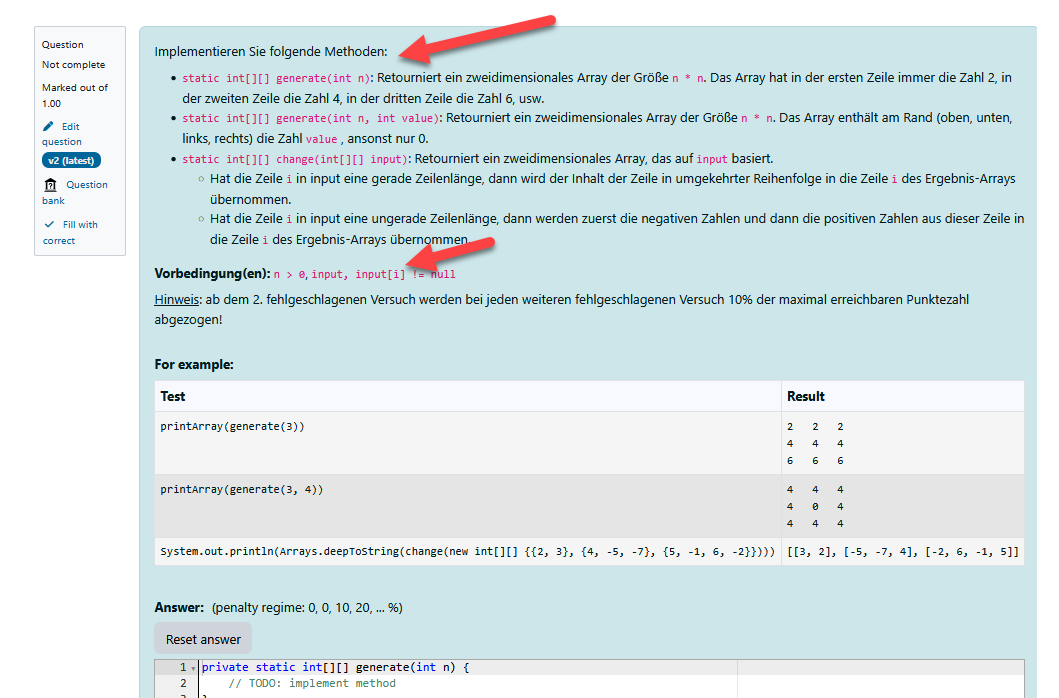


  • The font size in the TinyMCE editor is very small. Although it can be enlarged manually, the test cases remain small.

Ideally, it would be possible to change both the colour of the code and the font size via the site administration. Are there any options for this?

Thanks for any clue!
Maria 
In reply to Maria Dorfer

Re: Accessibility (colour and font size)

by Richard Lobb -

You can set custom css via the Site administration > Appearance > Themes panel. Click the "Settings" icon for your theme (Boost in our case) and there should be a panel that let's you set you custom css. For Boost it's in the Advanced settings pane. You could try something like the following in your Raw SCSS

div.coderunner code {
  color: inherit;
  background-color: white;
  font-size: 110%;
}

That gives you the following:

image.png

Be aware, though, that you're changing the appearance of <code> elements in CodeRunner questions for the entire site.
