Proxy with authentication - trouble with curl

Proxy with authentication - trouble with curl

by Ben Kasel -
Number of replies: 5

Hello everyone,

I am having trouble deploying Coderunner an I was hoping that I could find some help here.

Our Moodle instance runs behind a proxy  for outgoing requests that requires authentication. I managed to get STACK running, so the proxy works in that case.

I have a jobeinabox running on a vps.

When I submit a coderunner question for feedback, I can see that the proxy gives a 200 response so the connection to the jobe Server seems to work, but cURL complains and gives me the following error:
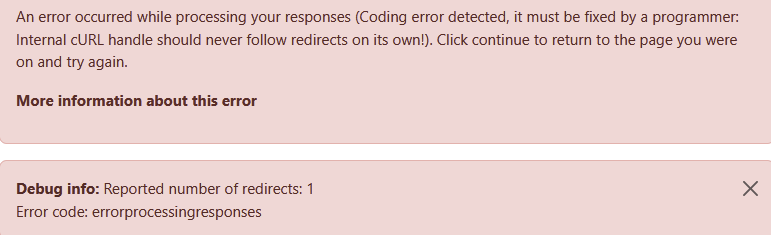

Has anyone else worked with outgoing proxies with the same problem. Any help or debugging suggestions are appreciated.

Kind Regards
Ben

In reply to Ben Kasel

Re: Proxy with authentication - trouble with curl

by Ben Kasel -
I found out some more information:
The error shown comes from the core moodle:
https://github.com/moodle/moodle/blob/213a869e7ffd48d3a5679818bcddbb22dbc31aa5/public/lib/filelib.php#L3804

somehow the curl call through the proxy returns a redirect_count of 1

However, when I just run a test script with a post request from the command line using php through the same proxy and I print out the number of redirects it shows 0, so I am a bit lost where the redirect comes from...
In reply to Ben Kasel

Re: Proxy with authentication - trouble with curl

by Richard Lobb -

I have no experience with Moodle servers configured to use a proxy server, but another user did complain some time back that CodeRunner wasn't respecting Moodle's "proxybypass" settings. 

Edit: don't try the following patch. Claude hallucinated! 

I've just chatted with my friendly AI Claude on the topic. Do you have access to the source code? If so, find the line

$curl = new curl();
 
in the file <moodle>/question/type/coderunner/classes/jobesandbox.php. It's at line 270 in the current master branch.
 
Change it to
 
$curl = new curl(['proxy' => true]);
 
THEN add your Jobe server's hostname or IP to the "Proxy bypass hosts" list in the Administration / Server / HTTP admin settings (again assuming you have access). From my (very limited) understanding, that should result in the Jobe outgoing requests bypassing the proxy server altogether.
 
I'll add that change to the list of changes to be pushed to the github repo in the next couple of weeks.
In reply to Richard Lobb

Re: Proxy with authentication - trouble with curl

by Ben Kasel -

Thank you for the quick response.

I will have a look at that solution. Currently I have monkey-patched the moodle filelib.php to set the number of redirects to 0 if the url corresponds to the jobeserver. 

I feel like there might be a small bug in the Moodle implementation of curl redirects. Moodle tests probably do not cover outgoing proxies and it seems to be a niche use case, because the was a bug in the http_client implementation of outgoing proxies:

https://moodle.atlassian.net/browse/MDL-88125

If I find time in the coming weeks, I will see if the curl call could be reimplemented using the core/http_client which seems to be the way forward:

https://moodle.atlassian.net/browse/MDL-85958

In reply to Ben Kasel

Re: Proxy with authentication - trouble with curl

by Richard Lobb -

Good to hear you've got it working, albeit with a monkey patch.

I just checked the Moodle curl class. Claude's suggestion of setting the proxy to true in the constructor looks to be exactly wrong. Setting it to false, however, would seem to bypass the proxy server unconditionally. Do you want to try that instead as an alternative monkey patch?

I wouldn't want to push that code to the repo, though. I think you're probably right that there's a bug in the Moodle curl class that's causing the issue.

I've reverted my code to just construct the $curl object with no parameters to the constructor.

In reply to Richard Lobb

Re: Proxy with authentication - trouble with curl

by Ben Kasel -
A proxy bypass is not an option in my case, because for security reasons, the only way to connect to the outside is via the proxy.

Thank you!